Optional AI

AI that answers to you.

Simply360 has two AI surfaces: Ask Simply for your signed-in team, and conversation widgets for the people you serve. Both are optional, both run under the same permissions as everyone else, both show their work, and both know when to hand the conversation to a person. That last part is not a limitation — it is the design.

Two flavors, one philosophy

Assistance for your team. Answers for your public.

AI in Simply360 is not a chatbot bolted onto the side — it is the same platform, made conversational. Which is why it inherits the things you already trust: permissions, workflows, verification, and audit.

Ask Simply

The assistant inside the platform

For Team Admins and Team Users: ask about your data in plain language and get cited answers, drafted follow-ups, and proposed changes — previewed and approved by a person before anything happens. It works everywhere in the webapp and in the Simply Anywhere mobile app.

Conversation widgets

The assistant on your website

A branded, embeddable assistant for donors, members, families, clients, and visitors: honest answers grounded in the content you connect, real actions through your verified public workflows, and a human handoff built in — on your hosted site or any site you already have.

Flavor one — Ask Simply

A colleague who has read everything you are allowed to read.

Ask Simply runs as the signed-in user. It gets no service account, no special role, no secret access — if you cannot see a record, neither can your assistant. Ask in plain language; it answers with sources, drafts with previews, and acts only after you approve.

Permissions are enforced by the platform, not by the AI’s good manners.

The executive director

“How does giving this quarter compare to last year?”

The number, the trend, and the donors behind it — in plain language with the live report linked, ready for the board packet.

The development director

“Which major donors haven’t heard from us in 90 days?”

Stewardship gaps become a question instead of a spreadsheet audit — with a drafted, personal check-in for each name if you ask.

The program manager

“Create a view of participants who completed intake this month.”

Ask Simply proposes the view, shows exactly what it will include, and shares it with your workspace when you approve.

The operations manager

“Add a preferred-language field to the volunteer collection.”

Schema changes become a sentence, a preview, and an approval — the settings-screen afternoon, done in the time it takes to describe.

The volunteer coordinator

“Draft a thank-you to everyone who helped on Saturday.”

It pulls the right people from live records and drafts the message in your voice — you approve before anything sends.

The team admin

“Why can Maria see this record and Lee cannot?”

Ask Simply explains your own permission setup in plain language — the question that usually means twenty minutes of clicking through roles.

There is a deeper mode for Team Administration: Ask Simply can explain and propose changes to schema, views, wizards, workspaces, websites, and permission grants — the configuration work that used to be an afternoon of settings screens. Sensitive settings like billing, credentials, and security stay explain-only or high-friction on purpose.

It drafts inside Website Studio too: pages, copy, and imports start as drafts in your style kit, and nothing publishes itself.

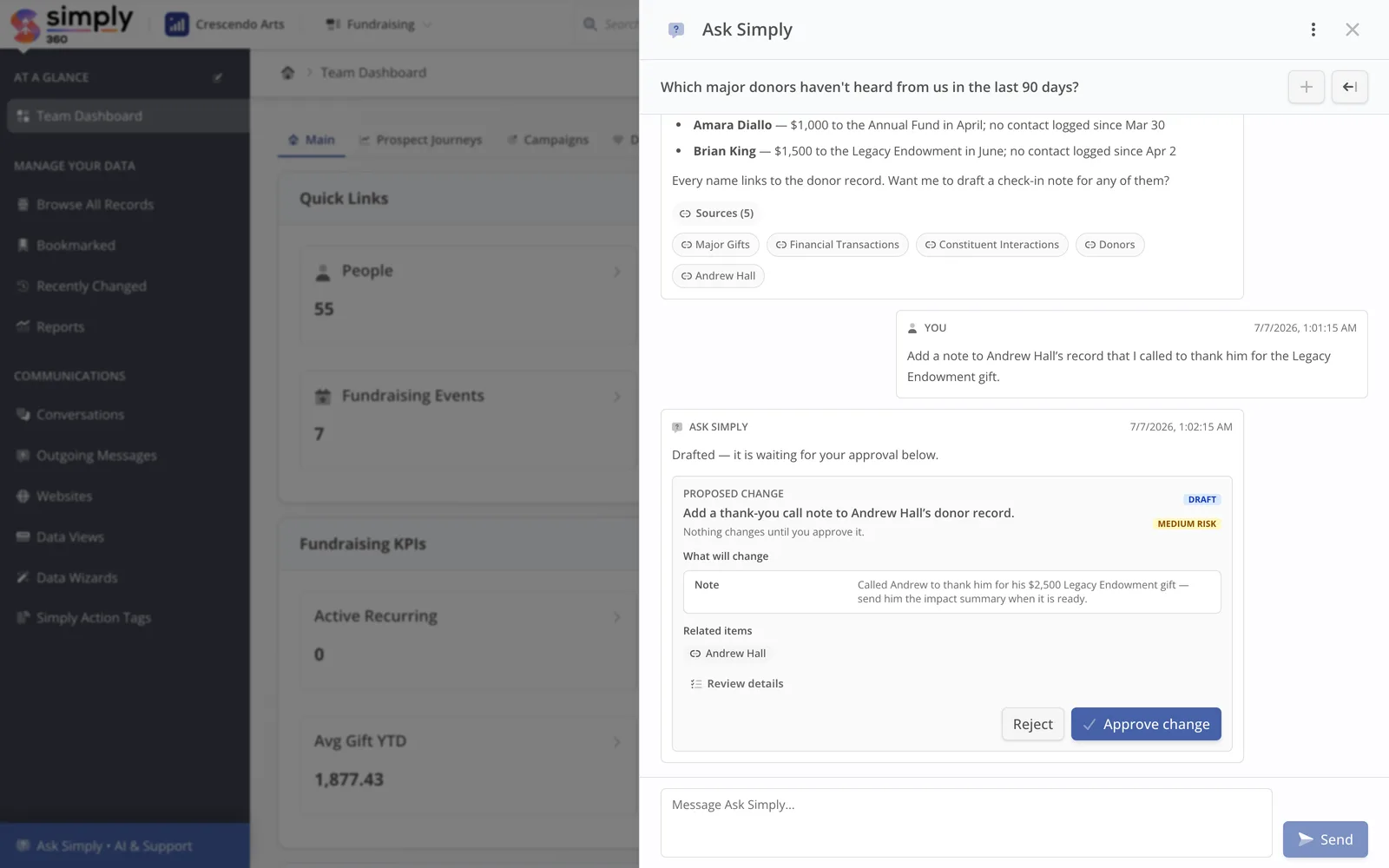
Ask Simply, mid-answer

Simply360 · Ask Simply
The Ask Simply drawer answering a stewardship question with cited sources and a proposed record change awaiting approval.
A real Ask Simply thread: it cites the collections behind the answer, names the donors, and drafts the follow-up as a proposal a person still has to approve — nothing changes on the record until you say so.

On the go

Chat is the perfect mobile interface for your whole system.

Ask Simply is built into Simply Anywhere, the mobile app for teams on Simply360. The walk to the board meeting, the donor lunch, the site visit: ask the question, get the cited answer, approve the follow-up — without opening a laptop.

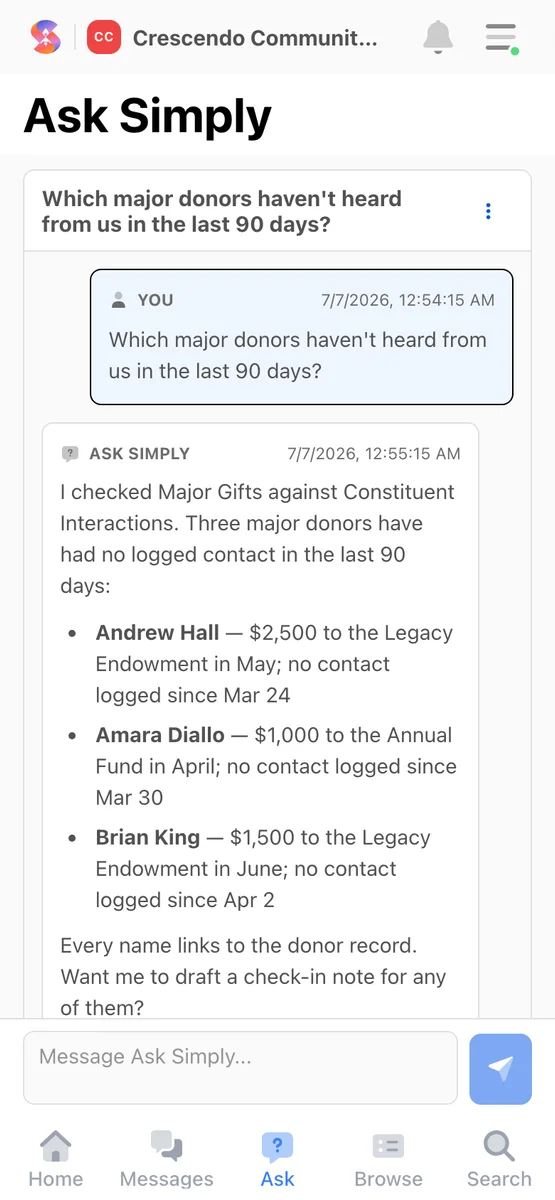
The full Ask Simply, inside the Simply Anywhere appSame permissions, sources, and approvals as your desk“When did this donor last give?” — answered walking inReview and approve proposed changes from anywhereYour records, messages, and notifications ride along
The Ask Simply thread open in the Simply Anywhere mobile app, showing a cited stewardship answer.
The same Ask Simply, in the Simply Anywhere app — cited answers and approvals from wherever the work is happening.

Flavor two — conversation widgets

Your website, answering honestly at 2 am.

Your constituents — donors, members, families, participants — ask predictable questions at unpredictable hours. A conversation widget answers them from the views, knowledge articles, and workflows you connect, completes real registrations and payments with the same verification as the rest of your site, and brings your team in the moment a person should take over.

A donor at 10 pm

“Where does my gift actually go?”

Answered from your published program and impact content, honestly and specifically — with your real donation flow offered when they are ready.

A member or parent

“Where is the renewal form?”

It finds the actual workflow and walks them through it in the conversation — a completed, verified record instead of a Monday-morning voicemail.

A would-be volunteer

“What can I do on weekends?”

Matched to the real roles you publish and signed up through your real form — intent captured the evening it appears.

Anyone who needs a person

“Can I talk to someone?”

Handoff to your team is built in, with the conversation attached. The assistant is honest about being an assistant — faking a person is how trust dies.

Customization and control

It speaks for you, so you hold the controls.

Widgets are configured, not coded: what each one knows, how it sounds, what it may do, and when it must step aside.

Voice

Guidance it actually follows

Voice and tone, words to use and avoid, escalation manner, and example answers — behavior training, not fact training. Each widget can run a deeper or faster AI model.

Grounding

Answers from your sources, cited

Each widget knows only the public views, knowledge base, and workflows you link. Semantic search understands that “learn a brass instrument” means trumpet lessons — but it searches your content, not the open internet.

Boundaries

No free-form writes, ever

Visitors act only through your public workflows and carts — the same verification, eligibility, and payment gates as everywhere else on your site. The AI cannot invent a write path.

Handoff

Humans, built in

Live handoff to your team, a message form for offline hours, and self-escalation when the assistant is unsure. Conversations land in your inbox with everything attached.

Oversight

A trace for every answer

Admins can see what each answer consulted, test the assistant safely before publishing changes, watch satisfaction scores, and mine unanswered questions for content gaps.

Scope

Audiences, on purpose

Audience gates and data-access levels decide what each widget may touch — a widget for the public and a widget for signed-in constituents can know very different things.

The boring safety story

Guardrails you can explain to a board.

None of this is fine print — it is the architecture, and it is the same whether you use AI a lot, a little, or not at all.

Permissions

Enforced by the platform, not the prompt

Ask Simply inherits the signed-in user’s permissions, and approvals re-check access at the moment they execute. Widgets see only what you connect. There is no “AI role” with special access anywhere in the system.

Infrastructure

Your data stays your data

AI runs on AWS through Amazon Bedrock, inside the same infrastructure as the rest of Simply360. Your data is not used to train AI models, and visitors never see internal tool machinery — just the answer and its sources.

Cost

Metered, capped, and public

Paid plans include monthly AI credit value, usage is metered visibly, and spending caps are on by default. Live conversation widgets carry a flat monthly price. Every number is published on the pricing page — none of it is quote-only.

Audit

A paper trail by default

AI usage, tool calls, proposals, and executed changes are logged. When someone asks “what did the AI do?”, the answer is a record, not a shrug.

Honest answers

If you never turn AI on, Simply360 is still Simply360.

Every AI feature is opt-in, feature by feature and widget by widget. Some teams will run their whole operation on Ask Simply; some will enable one widget for one busy season; some will decline the whole page — all three are using the product correctly.

The relationships this software exists to serve — with donors, members, families, clients — stay yours. The AI fetches, drafts, and answers so your team has more room for them, and it hands over the moment a human should be in the conversation.

Every product in the Simply app family includes these same two experiences, explained for the people who use it—from school offices to camp registrars to membership teams.

Bring us the messy workflow. We will make it feel simple.

Show us the spreadsheet, the system you have outgrown, the portal wish list, or the intake process. We will map it to Simply360 and show the calmest path forward.